 SnapPDF
The short answer
- No watermark on any PDF you make.
- No ads, and no account or sign-up.
- Works offline. Your photos and PDFs stay on your phone.
- The core features are free.
Six things to check in any scanner app
Before you switch, or before you pick a first scanner, check these. Here is how SnapPDF answers each one.
| Question | SnapPDF |
|---|---|
| Does the PDF carry a watermark? | No. The pages are exactly your scan. |
| Are there ads? | No. |
| Do you need an account? | No. Open SnapPDF and start. |
| Are your pages uploaded? | No. PDFs are made on your phone. |
| Does it work without internet? | Yes. Scanning, editing, creating and merging all work offline. |
| What does it cost? | The core features are free. Optional paid features may be added later, and the terms say so. |
What SnapPDF does
- Scan with the camera, or choose photos from your gallery.
- Crop (Free, A4, Original, Square or 4:3), rotate, duplicate or remove pages.
- Clean up with filters: Enhance, Grey, Black & white and Warm.
- Hold and drag pages into order.
- Make real A4 or Letter PDFs, choose the quality and see the size first.
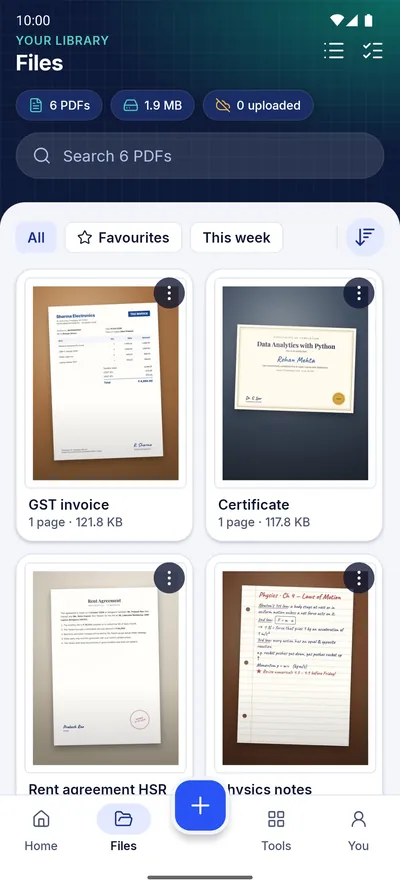
- Merge PDFs, and keep them in a Files screen with previews, search, sort, favourites and rename.
- Share to WhatsApp, Gmail, Drive or any app.
What SnapPDF does not do
- No text recognition (OCR). You cannot search the words inside a scan.
- No cloud storage for your PDFs. They stay on your phone, so back them up yourself if you need a copy elsewhere.
- No iPhone version. SnapPDF is for Android 10 and newer.
- No team or shared workspace.
If you need those, another app may suit you better. If you mostly need clean PDFs from paper and photos, without watermarks or sign-ins, SnapPDF covers it.
Moving over
Your existing PDFs stay wherever you saved them. SnapPDF’s Files screen lists the PDFs you make with SnapPDF. To join an older PDF with new scans, use Merge and choose it from your phone, for example from Downloads or Drive.
SnapPDF is not affiliated with, endorsed by or sponsored by CamScanner. Product names belong to their owners. For another app’s current features and prices, check its own store listing.
Questions
Can SnapPDF read the text in my scans?
No. It makes PDFs from your page images. It does not turn them into searchable text.
Is my data used for ads?
No. SnapPDF shows no ads and does not share data for advertising. Read the privacy policy for the details.